
.png?width=181&height=181&name=Upload%20Data%20(1).png)
Importing users in bulk is fast and easy with our simple two-step process. Follow the steps below to get your users into the system efficiently.
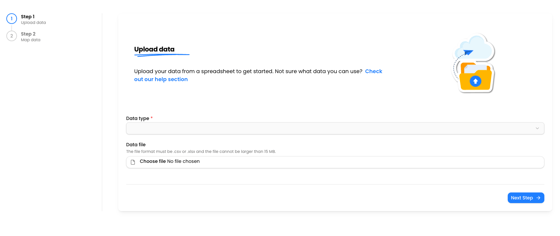
Step 1: Upload Your File
-
Prepare Your Spreadsheet
- Open your spreadsheet application (e.g., Excel, Google Sheets).
- Create columns for First Name, Last Name, and Email.
- Fill in the user information under the respective columns.
-
Save Your Spreadsheet
- Save your file in a supported format, such as .xlsx or .csv.
-
Access the Import Feature
- Navigate to the import section of the platform. This is found under Company Management.
- Select your upload type (e.g., "Users").
- Click the Upload button.
- Choose your saved spreadsheet file from your computer and confirm the upload.
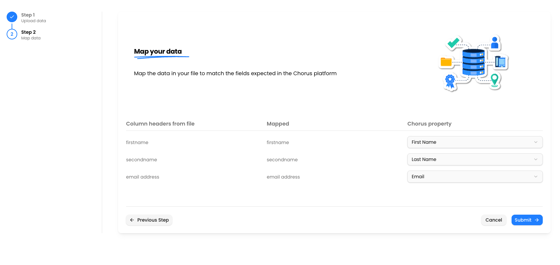
1. Map Your Columns
- Match each column from your spreadsheet to the corresponding field in the platform (First Name, Last Name, Email).
- Ensure all columns are correctly mapped for accurate import.
2. Complete the Import
- Review the mapped data for accuracy.
- Click the Import button to start the process.
- Once the import is complete, you will receive an email notification confirming the results.
- If there are any errors, the email will include details so you can address them quickly.
That's it! Your users will be added to the system as soon as the import finishes.