
 Who this is for: Administrators and training managers.
Before you start
-
You need an administrator account, and your company.
-
You must have the TMS (training management) module enabled .
Open the training schedule
-
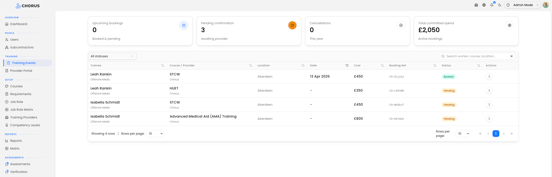
Select Training Events in the left-hand menu (under the Training heading).
At the top you'll see summary cards — upcoming bookings, bookings pending confirmation, cancellations, and total committed spend. Below them is the Training schedule table of all bookings.
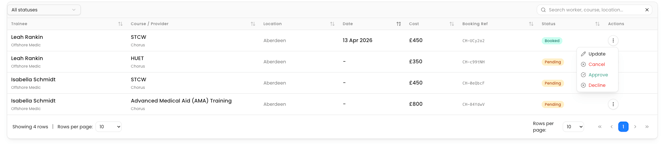
Use the status filter and the search box (Search worker, course, location...) to find a specific booking.
Where bookings come from
Trainees raise a booking by clicking Book Course against a requirement in their own app. That creates a request here with the course and delegate already filled in — the date, location, and provider details are confirmed by your team afterwards.
Update a booking
-
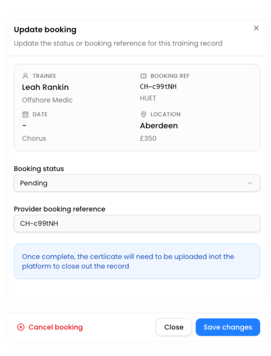
Click a row in the Training schedule to open the Update booking panel.
-
Review the read-only details (Trainee, Booking Ref, Date, Location).
-
Set the Booking status to reflect where the booking is up to.
-
Enter the Provider booking reference once you have it from the training provider.
-
Click Save changes.
You'll see Booking updated.
Cancel a booking
In the same panel, click Cancel booking and confirm. You'll see Booking cancelled, and it's reflected in the cancellations summary.
What happens next
Once the course has taken place, upload the resulting certificate into the platform to close out the record. The booking's status and your provider reference keep the schedule and spend figures accurate.
Tips
Add the Provider booking reference as soon as you have it — it's the link between your records and the provider's
Keep statuses up to date; the summary cards (and committed-spend figure) are only as accurate as the bookings beneath them