
Who this is for: Company administrators and system administrators.
Before you start
-
You need a company administrator or system administrator account.
-
Decide on the scale you want before you begin, so your levels read consistently.
Open competency levels
-
Select Competency Levels in the left-hand menu (under the Setup heading).
The page lists your existing levels with their Name and Description.
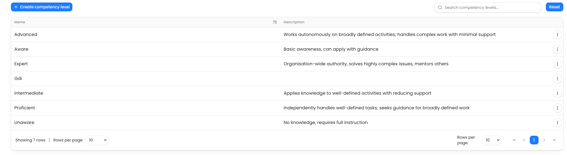
Create a competency level
-
Click Create competency level.
-
Complete the form:
– Name (required) — for example Beginner
– Description — optional context for what this level means -
Click Create.
You'll see Competency level created successfully and return to the list.

Edit a competency level
-
In the list, open the row's actions menu (the three-dots icon) and choose Edit.
-
Update the Name or Description.
-
Click Update.
You'll see Competency level updated successfully.
What happens next
Your competency levels become available when assessing evidence and when setting the expected level for a requirement on a job role.