
Who this is for: Administrators and training managers.
Before you start
-
You need an administrator account with the Competence or Compliance module enabled.
-
You'll get the most from the matrix once you have some job roles and requirements already setup.
Open the matrix
Select Job Role Matrix in the left-hand menu (under the Setup heading).
By default, training requirements are listed down the side (rows) and job roles run across the top (columns). A ticked, highlighted cell means that requirement is assigned to that role.
To flip the layout, use the Roles as rows / Roles as columns toggle.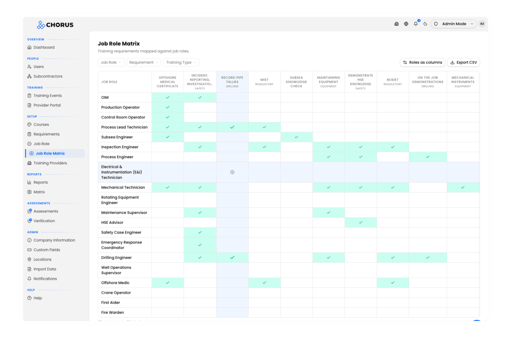
Assign a requirement to a role
- Find the cell where the requirement (row) meets the role (column) you want to link.
- Hover over an empty cell and click the + that appears.
- In the Assign Requirement dialog, check the Job Role and Training Requirement shown are correct.
- Click Confirm Assignment.
The cell immediately turns highlighted with a tick — there's no separate save step.
Find what you need
Use the filter drop downs above the grid to focus the view:
-
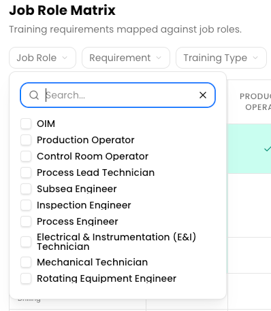
Job Role — show only certain roles.
-
Requirement — show only certain requirements.
-
Training Type — show only requirements with particular tags.
-
Each filter has a search box; click Clear all to reset them.
Export the matrix
Click Export CSV (top right) to download the current grid as a spreadsheet — one column per role, with an X marking each assignment. This is handy for sharing or auditing.
What happens next
Assigning a requirement here adds it to the role straight away, so any user with that role picks up the requirement in their training profile.
Tips
The matrix lets you add an assignment but not remove one. To unassign a requirement from a role, use the Job Role screen
Filters also shape what the Export CSV contains, so filter first if you only want part of the matrix