
 When creating a new user
The user creation wizard includes an Additional courses (or Initial courses) step at the end of the flow. After filling in personal details and company role information, you will reach a searchable list of all available courses. Tick the courses you want to assign, then click Submit to create the account with those courses already enrolled.
If your company uses compliance and competence training, this step is labelled "Additional courses" and a note explains that these sit outside job role requirements and do not affect the user's compliance status.
When editing an existing user
- Go to Users and open the user's record.
- Click the Training courses tab.
- A searchable list of all available courses is shown. Currently assigned courses are already ticked.
- Tick any courses you want to add, or untick courses you want to remove.
- Click Update to save.
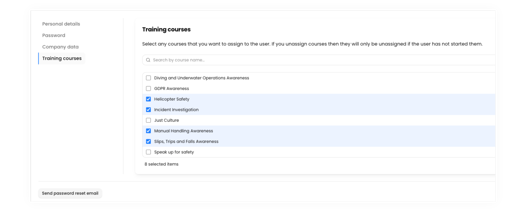
Note: if you untick a course the user has already started, it will not be unassigned — only courses that have not yet been started can be removed.
Things to know
- Courses assigned this way are in addition to any training requirements that come from the user's job role. Job role requirements are assigned automatically when a primary or secondary role is set on the Company data tab.
- You can search by course name within the list to find courses quickly in a long catalogue.
- There is no limit on how many courses you can assign at once.