
 Bulk Data Imports: Tips and Best Practices
Importing large amounts of data can save time and streamline onboarding, but following best practices ensures the process runs smoothly and efficiently. Use these tips to get the most out of your bulk data imports:
-
Use the Correct Template:
Download and use the latest spreadsheet template provided by the platform to avoid formatting issues. -
Required Fields:
Ensure all mandatory columns (e.g., First Name, Last Name, Email) are included and filled in for every record. -
Consistent Formatting:
Use consistent data formats (e.g., dates in YYYY-MM-DD, email addresses in lowercase, etc.) throughout your file. -
No Extra Spaces:
Remove leading or trailing spaces from your data to prevent import errors.
-
Check for Duplicates:
Remove duplicate entries to avoid creating multiple accounts for the same user. -
Correct Data Errors:
Fix typos, invalid emails, and ensure all references (such as department names or job roles) match those already set up in the system. -
Remove Unnecessary Columns:
Delete any columns in your file that are not needed for the import.
- Save your data as a .csv or .xlsx file, as these are generally supported by most platforms.
-
Test Run:
Import a small batch of records first to check for any errors or formatting issues before importing your full dataset. -
Review Results:
Check the system for successful imports and any error messages.
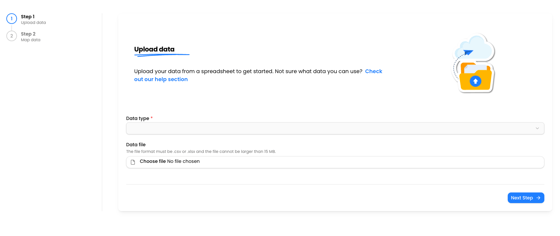
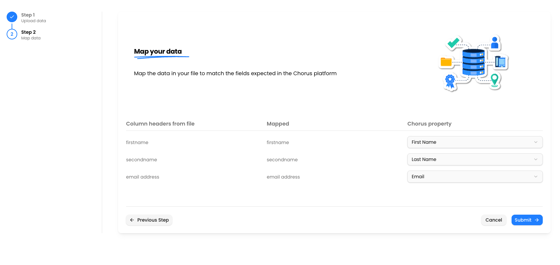
- During the import process, match your spreadsheet columns to the correct fields in the platform.
- Confirmation Email:
After importing, look out for a confirmation email indicating success or detailing any errors. - Error Resolution:
If errors occur, review the email or import log, correct the data, and re-import the affected records.
- Ensure your file does not contain unnecessary sensitive information.
- Handle spreadsheets securely and remove them from your device after the import is complete.
Following these tips will help ensure a smooth and successful bulk data import process.